Financial intelligence that holds up to review.

Quan is a finance-focused API for research, filing review, and portfolio analysis. It keeps quote context, source-backed evidence, and model interpretation separate so your product can show its work.

Read the developer docs
100,000 free Quan 3.4 L tokens No card required to start
Quan / research receiptEvidence-aware

Give the answer its working notes.

This is a product pattern, not a live market result.

ContextWhen quote context is available, Quan can pass it in as server-verified data. Your interface can also show when it is missing.
EvidenceGrounded research and filing material can sit beside the answer, with citations users can open.
InterpretationThe model's conclusion, assumptions, and open questions stay distinct from the source material.
1Compatible endpoint for messages, streaming, and model selection
100KIncluded Quan 3.4 L tokens after developer account verification
SSEText streams as analysis arrives, for responsive product and agent flows
MCPAn MCP server for research, quotes, filings, portfolio risk, and DCA

A finance answer should show where it came from.

Users already make calls around market moves, company filings, and portfolio exposure. Quan gives you a way to keep facts, sources, and model judgment visible in the same workflow.

Use current data with care.

For supported quote requests, Quan can add server-verified context. When a value is unavailable or stale, the response can make that visible instead of filling the gap.

Keep sources and conclusions separate.

Use grounding, filing-aware workflows, and structured metadata to show what came from a source and what came from the model.

Set a spending boundary.

Self-service usage is prepaid. Premium calls reserve and settle against the wallet, then stop when the balance cannot cover the next request.

Built for the questions people already have to answer.

Use Quan behind a research page, a filing-review queue, or an agent. Choose the model and grounding option that match the evidence and response depth the job needs.

Explain a market move.

Start with current quote context and ask the model to separate reported facts from possible drivers. Users leave with a useful summary and the next thing to check.

Review what changed in a filing.

Pull out revenue, margin, cash, guidance, liabilities, and risk-factor changes. A good filing workflow lets users inspect source passages before they act on a summary.

Let agents use finance tools with guardrails.

The MCP server exposes tools for quotes, filings, research, portfolio risk, and planning. Compatible clients get a concrete interface instead of a pile of prompts.

What the API can look like in a finished product.

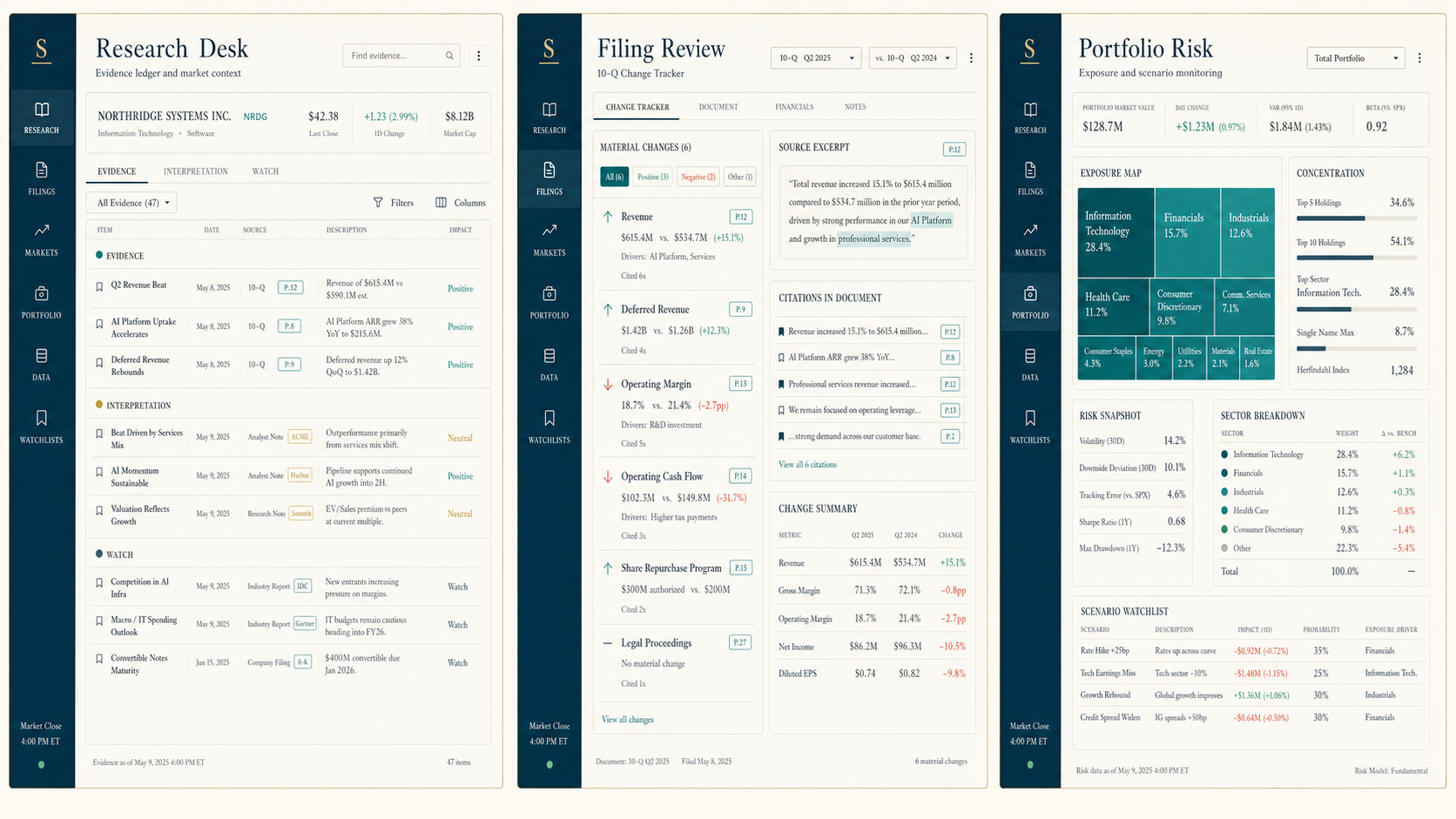
The API is the start of the work. These examples pair its output with sources, changes over time, and portfolio exposure so a user sees the answer in context.

Three StockUp product previews: a research evidence ledger, filing review workspace, and portfolio risk dashboard.

Read the evidence, then form the view.

See what changed before you read the summary.

Review concentration before it becomes a surprise.

Everything you need to evaluate it before you build.

Read the API contract, try a request, review pricing, and connect an agent through the public MCP server. Start with the docs, then test a small workflow that resembles production.

A sensible first build starts with one real workflow.

Create a key, choose a question with a clear finish line, and evaluate the response where it will actually be used. That tells you more than an open-ended demo.

Step 01

Create a server-side key.

Open a developer account, verify it, and create a key for your application or MCP client environment.

Step 02

Test one question end to end.

Use the included Quan 3.4 L allowance on a question your users already ask. Try it in the interface and data checks where it will live.

Step 03

Decide what deserves more depth.

Move to a deeper model or grounded search only when it helps the workflow. Watch response time, source quality, and cost together.

See how Quan handles a question your users already ask.

You get 100,000 Quan 3.4 L tokens after account verification. Test a real workflow, including up to two searches per grounded request, before adding prepaid balance.

Developer API billing

Know which allowance you are using.

Verified API accounts receive separate 100,000-token Quan 3.4 L and Quan 3.0 allowances. They apply only to those API models, combine input, output, and provider-reported reasoning tokens, and are shared across the account's keys. Deep Research, Quan 3.4, Quan 3.3, and unspecified models have no free allowance. Wallet funds do not expire or transfer between accounts.

StockUp provides research software and developer tools, not investment, tax, legal, or personalized financial advice.

Choose the reasoning depth that fits the question.

Quan models share a finance-native API surface, then differ in speed, context, and how much work they can take on in one pass. Start with the smallest model that can do the job well.

4Current models for fast responses, detailed analysis, and longer research
100KQuan 3.4 L tokens included for verified developer accounts
1 APIOne messages interface across the catalog, with streaming support

Use the model that matches the work in front of you.

The difference is practical. Some jobs need a quick research brief; others need a longer filing review or a multi-step analysis that deserves more time and context.

Quan 3.0

quan-3.0
Quan 3.0 model icon

A fast starting point for short market briefs, ticker-aware questions, routing, and early product experiments.

Context128K tokens
Starting costIncluded allowance
Read docs

Quan 3.4 L

quan-3.4-l
Quan 3.4 L model icon

A lower-cost 3.4 option for faster finance analysis when you need more room than a short response but do not need a long research pass.

Context200K tokens
Starting cost100K tokens included
Read docs

Deep Research

quan-3.4-deep-research
Quan Deep Research model icon

Use it for extended filing review, portfolio stress work, deeper diligence, and questions where the research process needs more room than a fast response.

Context200K tokens
Input / output$4 / $24 per 1M
Read docs

Model finder

Find the Quan model that fits your work.

Tell us a little about the work you are building. We will point you to the Quan model that makes the most sense to try first, then explain why.

This is a guide, not a gate. Your answers stay in this browser, and you can change direction as your product grows.

Question 1 of 5

What would you like the model to do most often?

A good first test uses a question your users already ask.

Start with the free Quan 3.4 L allowance, then add prepaid balance only when you need more tokens or a fuller research plan. The Quan 3.0 allowance remains available for fast, ungrounded work.

Test before you integrate

Playground

Choose a key and model, run a prompt, and inspect the response before you write integration code.

Response

Quan API response
Your response will appear here.
Ready Status
-- Latency
-- Tokens in / out
-- Speed
-- Estimated cost
0 Session errors
Action completed.