Documents is StockUp's feature for AI research reports and PDF documents. It is for investors doing their own company research and readers who want to examine a filing in a structured format. Quan 3.5 can produce an AI stock research report with analysis, tables, charts and dated sources. You can try it free today: create a Starter account, verify your email and receive 150 welcome credits, enough for one report, subject to automated abuse checks.
If you are looking for an AI equity research report generator to turn SEC filings into a report, start with the sources and the checks behind the PDF. For AI PDF financial analysis, you can also upload your own documents and ask questions grounded in their contents. Both uses belong in Documents, but a research report has its own outline, approval step and credit cost.
Try Quan 3.5 free or See sample reports before you start.
What a Quan research report contains
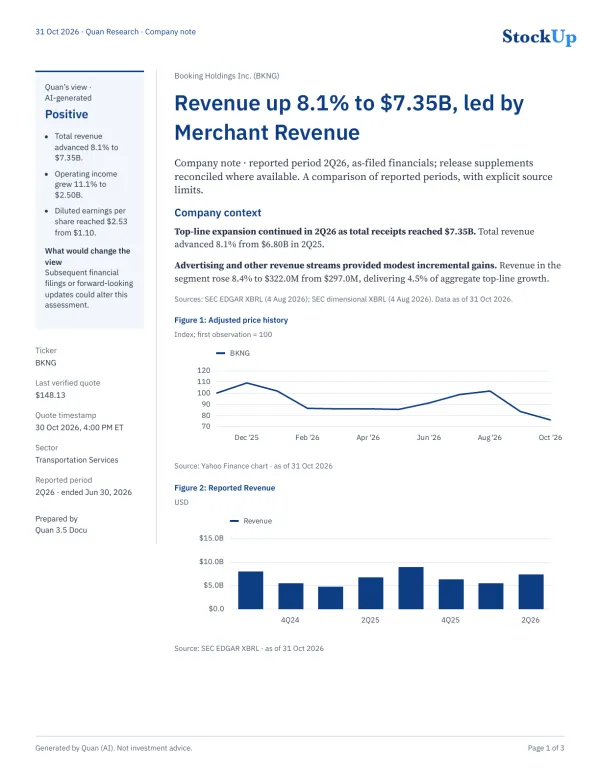
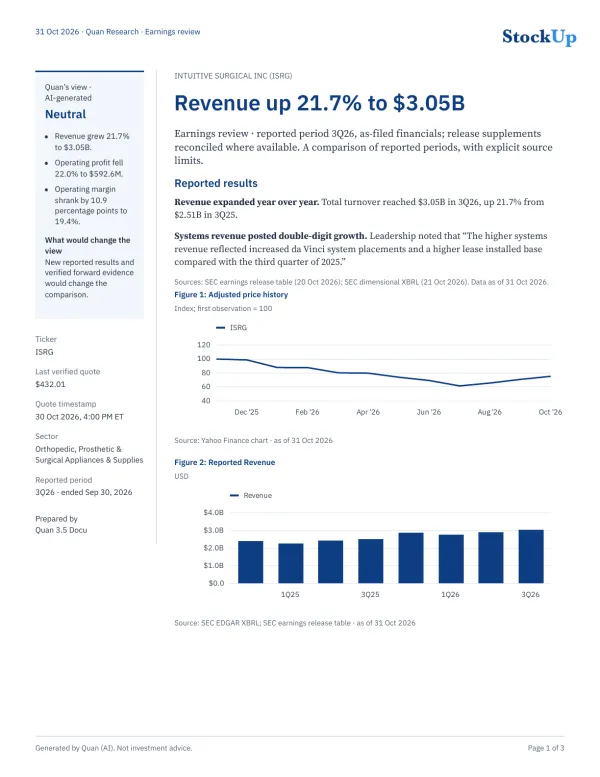
A company note looks at one company's latest reported period in context. An earnings review focuses on the quarter's results. The public samples show both formats, so you can judge the documents themselves rather than rely on a description of them.
The report brings the analysis into sections with financial summary tables and charts. Quan's view appears as AI-generated analysis, alongside the evidence for that view. It is not a broker rating. Read that section as the model's interpretation of the reported results, then compare it with the figures and disclosures underneath.
The closing sections deserve attention too. A missing-data section identifies information the report could not find or verify. The source list includes filing identifiers, filing dates and links, alongside dates for market data. Those details let you return to the material behind a claim and check which period the report actually covers.
Read the Booking Holdings 2Q26 company note and the Intuitive Surgical 3Q26 earnings review. Both were generated on October 31, 2026 and remain examples of those reports, rather than updates to today's company information.
How to turn SEC filings into a report
The report starts with your request and an outline you approve. Writing is one part of the process. StockUp also gathers the figures, draws the exhibits and checks the PDF before delivery.
1. Request a report
Choose Quan 3.5 on StockUp or the Quan page and ask for a company note or earnings review on one company. Name the company and the period you want to examine. Single-company report requests go to Documents; other questions stay in chat.
2. Approve the outline and cost
Review the proposed sections, charts and sources before generation starts. You can approve or edit the outline. Quan shows the credit cost at this step, so you can decide whether to proceed. A 2 to 4 page research report costs 150 credits.
3. Gather the source data
StockUp gathers a fact sheet from SEC filings and market data. Each figure carries its unit, period and source, with a filing or page reference where available. If a required value is missing, the fact sheet records that gap rather than asking the model to supply a number.
4. Write the analysis and draw the exhibits
Quan writes the report sections using the gathered evidence. StockUp code inserts financial figures from the sources into the prose. Code also draws the charts and tables from that data. The model writes the explanation; it does not draw the chart labels or invent the table values.
5. Check the claims separately
Model-written statements receive a separate verification pass. Numerical checks compare figures with the source data, including their units. Unsupported statements can be removed. The report includes a verification note about statements Quan could not verify, so you can see that the checks affected the finished text.
6. Check and deliver the PDF
StockUp checks the finished PDF for layout problems and whether chart and table figures match their source values. You then receive a document you can read and download. Save a copy if you want to keep it: generated files are normally scheduled for deletion after 30 days.
What the checks tell you, and what they cannot
A figure with a source and a period gives you something concrete to check. StockUp inserts figures from the cited material, while a separate verification step examines the model's written claims. That distinction matters when a paragraph sounds persuasive: the explanation and the numbers still need to agree.
The samples also show why a missing-data section belongs in a research report. The Booking Holdings note lists gross profit among its gaps. The Intuitive Surgical review records values it could not reconcile between the earnings release and filing data. An unavailable value stays unavailable rather than becoming an estimate presented as a reported fact.
Missing evidence also limits the explanation. The Intuitive Surgical sample says that a lack of verified guidance does not establish that the company omitted guidance. That is a useful distinction when reading any AI report: what the loaded sources establish can be narrower than what the company has said elsewhere.
AI-generated analysis; not investment advice. Reports can contain errors and should be verified. Check important figures, citations and conclusions against the original filings before relying on them. Verification checks reduce errors but do not eliminate them.
Work with your own PDF documents
You can bring PDFs such as filings and earnings releases into Documents and ask questions grounded in their contents. For example, ask for a summary of the uploaded filing or an explanation of a passage you want to understand. Keep the original open so you can compare the answer with what the document says.
Uploading a PDF and commissioning a company research report are related uses, but review the outline and source list for the report you request. They tell you what it will cover. A question about an uploaded document is not a reason to assume every claim in a later report came from that file.
Under the Terms, uploaded source content is normally scheduled for deletion after 24 hours. Generated files are normally scheduled for deletion after 30 days. Download reports you want to keep. Treat the document workspace as a place to work with files, rather than your permanent archive.
Report costs and your first free report
A 2 to 4 page research report costs 150 credits, which is $1.50. One credit represents one cent of eligible StockUp services. You see the cost before approving the request. StockUp reserves the credits when the report starts and charges them only on delivery. If the report fails or you cancel it, the reserved credits return automatically.
New Starter accounts receive 150 welcome credits once after email verification and automated abuse checks. That covers one report of this length. Plus includes 500 credits a month; Pro includes 1,000. Plan credits reset monthly and do not roll over. Purchased and welcome credits do not expire while your account remains open, subject to the legal exception in the Terms. Included plan credits are used first.
To start, create a free account, verify your email and choose Quan 3.5. Request a company note or earnings review for one company, then inspect the outline and cost. Before approving, decide which period you want to read about and whether the proposed sections answer your question. The plans page explains the current allowances and credit terms.
Try Quan 3.5 free, See sample reports, or See plans.
Frequently asked questions
How much does an AI stock research report cost?
A 2 to 4 page Quan research report costs 150 credits, or $1.50. One credit represents one cent of eligible StockUp services. The credit cost appears before you approve the request.
Can I try a report for free?
Yes. New Starter accounts receive 150 welcome credits once after email verification and automated abuse checks, enough for one 2 to 4 page research report. Starter is free.
What happens if a report fails?
Credits reserved for a report are charged only when the report is delivered. If it fails or you cancel it, the reserved credits return automatically.
How long does StockUp keep my files?
Uploaded source content is normally scheduled for deletion after 24 hours, and generated files after 30 days. Download any generated PDF you want to keep.
Can I use my own PDFs?
Yes. You can upload PDFs such as filings and earnings releases and ask Quan questions grounded in their contents. Check important answers against the original document.
Which companies can I request reports about?
Documents handles requests for a report on one company. The public samples cover Booking Holdings and Intuitive Surgical, using SEC filings and market data. These examples do not guarantee coverage for every ticker. A report lists missing or unverified data.
Is a Quan research report investment advice?
No. It is AI-generated analysis for research and education, not investment advice. Reports can contain errors and should be verified against their original sources. Quan's view is not a broker rating.
Do my credits expire?
Purchased and welcome credits do not expire while your account remains open, subject to the legal exception in the Terms. Plus includes 500 credits a month and Pro includes 1,000. Included plan credits reset monthly, do not roll over, and are used first. Credits have no cash value and are lost if you delete your account.